

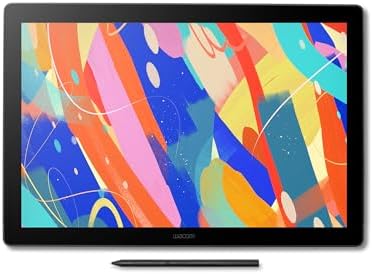
Redefining the Creative Canvas: A Deep Dive into the Wacom Cintiq 16 (2025 Edition)
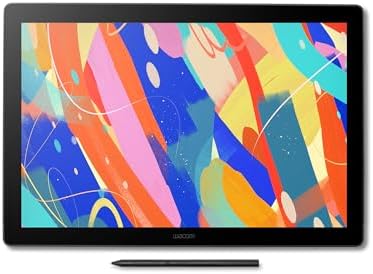
For many digital artists, the transition from a traditional pen tablet to a pen display marks a significant milestone in their creative journey. The ability to draw directly onto a screen removes the disconnect between hand and eye, fostering a more natural and intuitive workflow. Wacom has long been a standard-bearer in this industry, and the introduction of the Wacom Cintiq 16 (2025 Edition) represents a refined evolution of their most popular mid-range display. This latest iteration seeks to bridge the gap between hobbyist tools and high-end professional equipment, offering a sophisticated 2.5K resolution and the inclusion of the acclaimed Wacom Pro Pen 3.
Designed for illustrators, concept artists, and photographers who require a compact yet powerful workstation, the 2025 Edition focuses on clarity, ergonomics, and connectivity. It addresses the needs of a modern workspace where desk real estate is at a premium but visual fidelity cannot be compromised. By integrating features previously reserved for the “Pro” line into this 16-inch form factor, Wacom has created a tool that feels both accessible and uncompromisingly professional.
Precision Visuals and the Tactile Art of Digital Illustration

The most striking upgrade in the 2025 Edition of the Cintiq 16 is undoubtedly the jump to a 2.5K resolution. While the previous 1080p model was a reliable workhorse, the increase to 2560 x 1600 pixels on a 16-inch screen significantly enhances the pixel density. For the user, this translates to sharper lines, smoother gradients, and a noticeable reduction in the “screen door effect” that can sometimes plague lower-resolution displays. When working on intricate line art or detailed photo retouching, this clarity allows for a higher degree of precision, as users can see the minute details of their work without constantly needing to zoom in and out.
The visual experience is further refined by the use of anti-glare etched glass. Unlike cheaper alternatives that use plastic films to reduce reflections, etched glass is a premium solution that provides two distinct benefits. Firstly, it scatters reflected light, making it much easier to work in environments with overhead lighting or near windows. Secondly, and perhaps more importantly for the artist, it provides a subtle tooth or friction. This “pen-on-paper” feel is essential for maintaining control over strokes. It prevents the pen tip from sliding uncontrollably across a slick surface, giving the artist the tactile feedback necessary for confident mark-making.
Complementing the high-resolution screen is the inclusion of the Wacom Pro Pen 3. This is a significant leap forward for the Cintiq 16 line. The Pro Pen 3 is renowned for its customisable ergonomics; it allows users to adjust the weight, thickness, and button configuration of the pen to suit their specific grip. This level of personalisation is vital for long creative sessions, as it helps to reduce hand fatigue. With 8,192 levels of pressure sensitivity and exceptional tilt recognition, the pen responds to the lightest touch, mimicking the behaviour of traditional media like charcoal, brushes, or technical pens. The reduced parallax—the gap between the pen tip and the cursor—ensures that the “ink” appears exactly where the artist expects it to be, further blurring the line between digital and physical creation.
Ergonomic Integration and Modern Connectivity for the Contemporary Studio
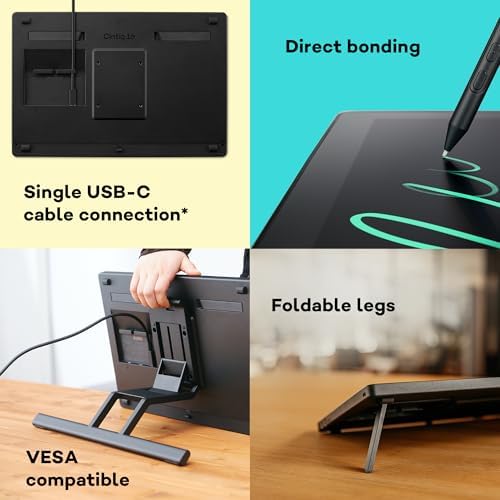
In the modern creative environment, efficiency is often dictated by how well a device integrates into an existing setup. The Wacom Cintiq 16 (2025 Edition) has been redesigned with a focus on a streamlined workflow. One of the most practical additions is the built-in foldable feet. These feet allow the tablet to be instantly propped up to a 20-degree working angle, which is widely considered the “sweet spot” for preventing neck strain while drawing. For those who prefer a more vertical or adjustable setup, the tablet remains compatible with optional stands, but the inclusion of stable, integrated feet means that the device is ready for professional use straight out of the box without requiring additional furniture.
The physical footprint of the device has also been considered. Slimmer bezels mean that the 16-inch screen occupies less space on the desk than its predecessors, making it an ideal choice for artists working in smaller studios or home offices. This compact design does not sacrifice stability; the build quality remains robust, ensuring the tablet stays firmly in place even during vigorous drawing sessions. The focus on ergonomics extends to the overall “feel” of the device, which manages to be lightweight enough for occasional transport while remaining substantial enough to feel like a permanent fixture of a professional desk.
Connectivity has seen a major overhaul to align with contemporary hardware standards. The 2025 Edition supports a streamlined USB-C connection, which can handle data, video, and power through a single cable, provided the host computer supports DisplayPort Alt Mode and USB Power Delivery. This “one-cable” solution is a revelation for those tired of the “octopus” cables of the past, significantly reducing desk clutter and making it easier to connect the tablet to modern laptops like MacBooks or high-end Windows ultrabooks.
Furthermore, the device’s compatibility extends beyond the traditional desktop environment. With support for Windows, macOS, and even certain Android devices, the Cintiq 16 becomes a versatile tool for various workflows. An animator might use it with a powerful workstation for rendering, while a concept artist might connect it to a compatible Android tablet for a more portable, though still high-fidelity, sketching setup. While the box includes the necessary USB-C cables for a modern setup, Wacom has also ensured that users with older hardware can still utilise the display via HDMI, provided they use the appropriate adapters. This flexibility ensures that the Cintiq 16 (2025 Edition) is a future-proof investment that can adapt as the user’s hardware ecosystem evolves.
The inclusion of the Vari-angle Pen Stand is another thoughtful touch. It doesn’t just hold the pen; it stores the nib removal tool and extra nibs (both standard and felt), ensuring that the artist always has the tools they need within reach. The felt nibs, in particular, are a favourite among those who want an even more textured, charcoal-like feel on the etched glass surface. By focusing on these small but impactful details, Wacom has created a product that respects the artist’s process, allowing them to focus entirely on the act of creation rather than the limitations of their hardware.
To see the full technical specifications and current availability, please check the product details on Amazon.